Open-Source Product Segmentation for Indonesian Retail: Fine-tuning RF-DETR Nano
I just released a small segmentation model that does one thing: find the product in a photo and cut it out cleanly. It’s called retail-product-seg-rfdetr-n, a fine-tuned RF-DETR Nano with exactly one class: product.
That sounds simple, but getting there took a lot of wrong turns. The model card already covers installation and code, so this post is about the decisions behind the model: what I tried, what broke, and why the final version looks the way it does.
The context is Indonesian retail. Think of a warung, a small neighborhood shop where products hang in long strips of sachets, sit in glossy plastic packs, or come in cardboard display boxes. I wanted a system that can look at a photo of one of those products and figure out what it is. This model is the first step of that system.
Key facts
| Item | Detail |
|---|---|
| Model | rahmanenjozz/retail-product-seg-rfdetr-n |
| Task | Instance segmentation, class-agnostic |
| Classes | 1 (product) |
| Base model | LibreYOLO/LibreRFDETRn-seg (RF-DETR Seg Nano) |
| Input size | 312 x 312 px |
| Mask mAP50-95 | 0.950 (internal validation, 58 images) |
| File size | ~133 MB (.pt), ~123 MB (ONNX) |
| Formats | PyTorch .pt, ONNX FP32 |
| Training framework | LibreYOLO |
| License | Apache 2.0 |
| Best for | Photos of one or a few clearly separated packaged products |
| Demo | Hugging Face Space (runs in your browser) |
Why segmentation instead of plain detection
The model’s job is to hand a clean crop to the next stage: searching for the product by image. A detector like YOLO gives you a bounding box, and a box around a sachet still contains the shelf, the hand holding it, or the next sachet in the strip. A segmentation mask contains only the product.
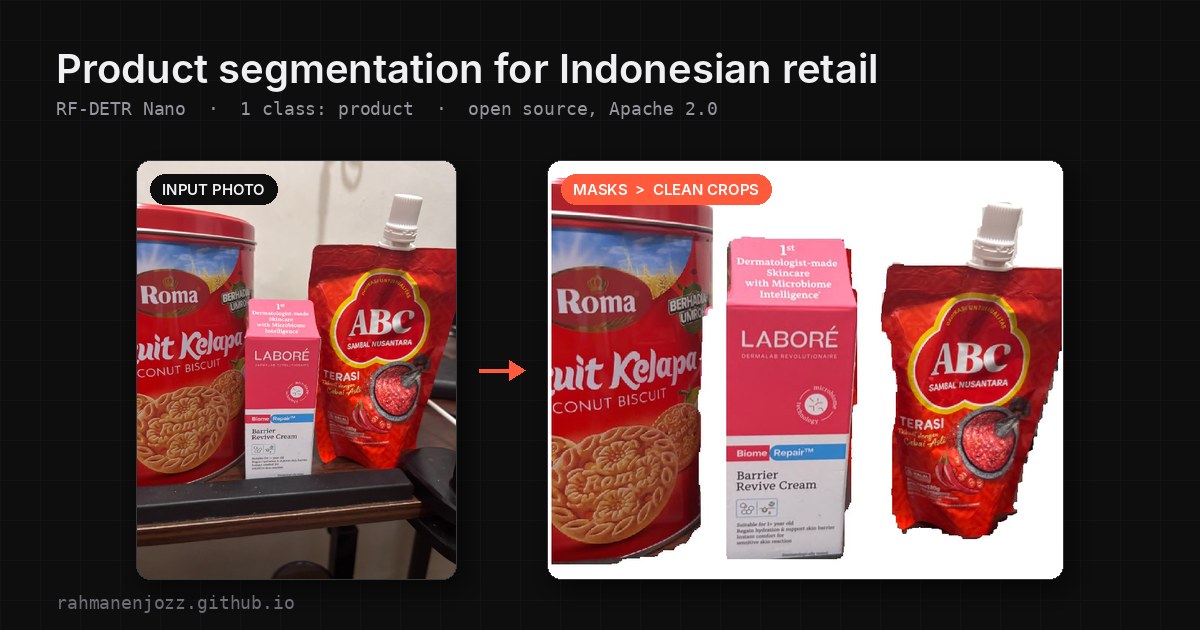 Left: the input photo. Right: each product cut out by the model, ready for the search stage.
That makes the search stage both cleaner and more efficient. The image it compares is just the product, so background clutter can’t pull the results toward the wrong match, and there’s no need for a separate background-removal step before the search. For anything that compares product images, that matters more than a few points of mAP.
I kept it to a single class on purpose. The model only answers “where is the product?” and never needs to know which product it is. Identifying the exact item is a separate problem for a later stage. Because the model is class-agnostic, it doesn’t need retraining every time a new product shows up in a catalog.
The dataset: where most of the work went
The dataset is internal and I’m not releasing it, but building it taught me more than the training did. Most photos show one product; some show a few clearly separated ones. I only labeled products that had text or a logo on the packaging; plain packs without branding were left unlabeled. Everything that was labeled used a polygon mask.
I started with bounding boxes in LabelImg. It was quick, but once I decided I needed masks I had to switch, since LabelImg only does boxes and the project is archived. I moved to X-AnyLabeling, which supports polygons and has SAM built in to suggest a mask with one click.
SAM saved a lot of time on easy products like boxes and bottles. It struggled on exactly the things that make warung products hard:
- Sachet strips. Adjacent sachets often merged into one blob, because to SAM they look like one continuous object.
- Glossy and clear plastic. Reflections and transparent edges made the mask leak into the background or cut through the product.
- Display boxes. A cardboard box full of small packs was sometimes split into many pieces and sometimes treated as one.
I fixed those by hand, one polygon point at a time. Auto-labeling handled the easy 60 percent; the remaining 40 percent took most of the effort, and it’s what makes the dataset worth having.
Choosing the slower model on purpose
I trained with LibreYOLO, which made it easy to compare model families on the same data. The latency numbers below are median times from a live camera feed on my laptop’s GPU, a GTX 1650 with 4 GB of VRAM.
| Model | Median latency (GTX 1650 4GB) | Mask quality |
|---|---|---|
| YOLO26 | ~85 to 110 ms | Best of the three |
| YOLOv9 | ~85 to 110 ms | Noticeably worse |
| RF-DETR Nano Seg | ~300 ms | Close to YOLO26, cleaner than YOLOv9 |
YOLO26 was the obvious first pick: strong masks and low latency. But it is distributed under the AGPL-3.0 license, which doesn’t fit how I want to use and ship this model, so I looked for an option with a permissive license.
YOLOv9 was just as fast on the same GPU, but the masks were clearly worse on my data. That ruled it out for this pipeline.
RF-DETR Nano Seg landed in the middle on quality and last on speed. On paper YOLO wins at roughly three times the throughput. This model doesn’t run on every video frame, though. It runs once on a photo the user already took, and its output feeds a search step. For that, 300 ms is fine, and I’d rather keep a mask close to YOLO26’s quality under a license I can ship with.
RF-DETR has two more practical advantages: its DINOv2 backbone converges quickly on small datasets, and the Nano to 2XL segmentation weights are released under Apache 2.0.
The CPU optimization rabbit hole
On the GPU, 300 ms was workable. On CPU it was a different story: in my browser demo running on WebAssembly, my laptop’s Ryzen 5 5600H took around 1,600 ms per image. Not every device has a usable GPU, so I tried to make it faster.
- I started by exporting to ONNX FP32. LibreYOLO’s built-in INT8 export only supported YOLOv9 detection at the time, not RF-DETR, so I had to quantize by hand.
- I tried both dynamic and static INT8 quantization. Static INT8 needs calibration images, and calibrating with 200 images ran out of memory; dropping to 50 images with percentile calibration finally worked.
- Both INT8 versions came out smaller and faster, but mask accuracy dropped enough to notice. Transformers are more sensitive to quantization than CNNs, and it showed in the masks. The CPU also lacks VNNI instructions for fast INT8 math, which limits how much speed INT8 can deliver on it.
- I wanted to try SmoothQuant to reduce the accuracy loss. Instead I spent an evening fighting dependencies: a missing
pkg_resources, then version conflicts, which I solved by pinning older versions ofsetuptoolsandneural-compressor.
So for this first release I shipped the plain .pt and an FP32 ONNX. Getting a quantized version that keeps mask quality is the next thing I’m working on. A fast model that cuts products in half would be useless for this pipeline.
Two small surprises
Nano and Small are almost the same size. I trained both: Nano (312 px input) reached 0.950 mask mAP50-95 and Small (384 px) reached 0.964. I expected Nano to be much smaller on disk, but both .pt files came out around 133 MB. According to Roboflow’s own benchmark table, RF-DETR Seg Nano has 33.6M parameters and Small has 33.7M. The variants mostly differ in input resolution and decoder configuration, so Nano is faster because it sees fewer pixels, not because the network is lighter. With only 0.014 mAP between them, I released Nano first.
The training checkpoint was also four times bigger than it needed to be. The raw best.pt was about 535 MB, and most of that was training state: the optimizer, the gradient scaler, random number generator state, and a config containing my local file paths. After I stripped everything inference doesn’t need, the file dropped to about 133 MB, and I verified it gives identical predictions.
A demo that runs on your own device
The demo Space started as a Gradio app on a hosted GPU. I switched it to a static page that runs the ONNX model directly in your browser, with no server and no PyTorch. Upload a product photo and it draws the masks and gives you a clean crop of each product with the background removed. It uses WebGPU when your browser supports it and falls back to WebAssembly on the CPU, and it shows which one it used next to the timing. The timing covers the model run only, not image preprocessing.
The main reason is that you can try it on your own hardware. The latency you see is the latency the model has on your laptop or phone, not on my GPU. That tells you more about whether the model fits your use case than any number I could put in a table.
On my laptop’s GTX 1650, the demo with WebGPU runs at about 300 ms per image, the same as in the camera test above. On a phone with an A16 Bionic chip, it takes around 800 ms with WebGPU and around 1,100 ms with WebAssembly on the CPU. The YOLO numbers in the earlier table come only from the camera test, since the demo runs RF-DETR alone.
What this model is not
A mask mAP50-95 of 0.950 looks impressive, so here’s the context. I measured it on 58 internal validation images that look like the training data: clear photos of one product, or a few well-separated ones. It isn’t comparable to COCO or any public benchmark.
The model isn’t built for crowded shelf photos, heavy occlusion, or extreme lighting, because those cases are rare or missing from the data. Point it at a full supermarket aisle and expect it to struggle. I’d rather say that here than have someone find out in production.
I plan to retrain it with more training images and a larger validation set, and push the update to the same Hugging Face repo.
FAQ
Can RF-DETR do instance segmentation? Yes. Roboflow released RF-DETR Seg checkpoints from Nano to 2XL, and this model is a fine-tune of the Nano segmentation variant.
RF-DETR or YOLO for product segmentation? In my tests on a GTX 1650, YOLO26 gave the best masks and ran at about 85 to 110 ms, while RF-DETR Nano Seg took about 300 ms with masks close to YOLO26’s. YOLO26 is distributed under AGPL-3.0, while RF-DETR is Apache 2.0. If speed matters most and the license fits your project, YOLO26 is the stronger option. If you need a permissive license, RF-DETR is a good alternative.
How fast is RF-DETR Nano Seg on CPU? In my browser demo, which runs the FP32 ONNX model with WebAssembly on the CPU, it takes about 1,600 ms per image on a Ryzen 5 5600H and about 1,100 ms on a phone with an A16 Bionic chip. With WebGPU on that same phone, it drops to about 800 ms. The demo lets you check the speed on your own device.
Why is RF-DETR Nano almost the same file size as Small? The two have nearly identical parameter counts (33.6M vs 33.7M). Nano is faster because it runs at a lower input resolution, not because it is a smaller network.
Does INT8 quantization work well on RF-DETR? In my tests, INT8 made the model smaller and faster, but mask accuracy dropped noticeably. Measure mask quality after quantizing, since transformers are more sensitive than CNNs.
Can I use this model commercially? Yes. It’s released under Apache 2.0, which allows commercial use.
Does it work on supermarket shelf photos? Not well. It was trained on photos of one or a few clearly separated products, not crowded shelves.
Try it, and what comes next
You can try the model in your browser through the demo Space. The weights, usage code and full model card are on Hugging Face, under Apache 2.0.
This model is the first stage of a product search system I’m building. The later stages stay private for now, but the segmentation step seemed general enough to help others working on retail, POS or catalog problems.
Next on the public side: a retrained version with more data, a quantized variant that keeps mask quality, and possibly the Small model. If you’re working on product recognition from photos, I’d like to hear from you on LinkedIn.